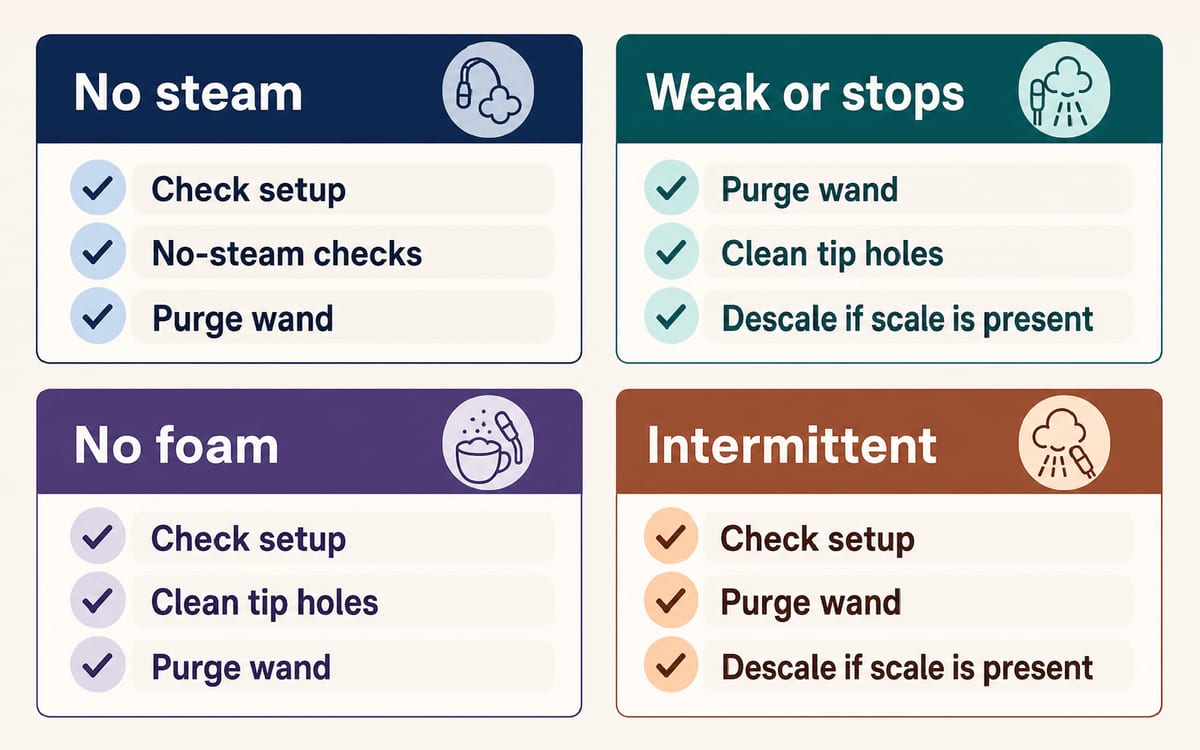
Steam that stops, weakens, or heats milk without foam
Start by separating a milk-texture problem from a wand that has changed how it steams. The useful difference is what the wand does. If the steam force feels normal, auto texturing finishes, and the jug, wand position, milk level, and selected settings are right, you may be dealing with milk choice, temperature, or technique. If the wand stops early, loses force, pulses, shows a frother error, or heats milk without foam after it used to work, troubleshoot the wand before changing your milk technique.
Use this quick split before changing parts or running another cleaning cycle:
| What you see | First check | What should change |
|---|---|---|
| Auto froth stops with cold or barely foamed milk | Verify jug, sensor, wand position, milk level, and temp/foam settings | Auto texturing should continue until the selected milk temperature |
| Steam is weak but espresso seems normal | Clean and purge the wand tip, then check tank seating | Steam force or distribution should improve if the tip or water feed was the issue |
| Milk heats without foam | Compare manual and auto behavior, and inspect tip holes | Failure across modes points away from simple settings or technique |
| Problem appears after a shot, first run, or reboot | Record the sequence before retesting | A repeatable pattern is useful for support or warranty service |
| Espresso or brew water is also lukewarm | Stop treating it as a frothing-only problem | Check broader heating, scale, and water-flow guidance |
Auto froth can stop early when the jug or wand is wrong
Before cleaning the wand, check the jug, sensor, wand position, milk level, and selected temperature and foam settings. Use fresh cold milk in the supplied jug, fill between the min and max marks, rest the jug on the milk temperature sensor on the drip tray, fully lower the wand, and make sure the milk covers the steam-wand tip. Then choose the MILK TEMP and MILK FOAM settings.
During normal automatic texturing, the STEAM button flashes and the machine stops when the selected milk temperature is reached. That stop should make sense: the milk should be near the chosen temperature, not still cool, barely warm, or unfoamed.
If the MILK TEMP and MILK FOAM lights step downward on the control panel, lower the wand so the automatic purge can run; it is not a milk-foam setting to adjust. Lower it and allow the automatic purge. Breville warns that leaving the wand raised after texturing can contribute to blockage.
A flush and tip clean are worth doing, but they are not a verdict
After milk texturing, lower the wand so it can purge, then wipe the wand and tip. If steam is weak, sputtery, or uneven, clean the steam tip holes before assuming an internal fault.
For the home check, rinse the steam tip, wipe it with a clean dry cloth, clear blocked holes with the provided cleaning tool or a compatible steam-wand needle or narrow brush, screw the tip back on, and purge again. Breville’s support guidance links milk residue and debris with clogged wands, and the instruction book supports cleaning blocked tip holes with the supplied tool.
Owners with this symptom often find the trap here: clear visible holes do not always mean the wand has enough pressure or even distribution to froth. If milk still heats slowly, the steam seems almost pressureless, or the wand stops early after the tip has been cleaned and purged, continue the diagnosis instead of repeating the same cleaning loop.
Check the tank before chasing a deeper steam problem
For no-steam symptoms, Breville’s basic checks are operating temperature, water level, and water-tank seating. Fill the tank, push it fully down, and confirm it sits flush against the back of the machine. The 1 CUP, 2 CUP, and STEAM buttons illuminate when the tank is correctly attached.
This matters most after refilling, moving the machine, cleaning, or descaling. A slightly unseated tank can look like a steam fault because the wand is the place you notice poor flow first.
Now compare the rest of the machine. Normal espresso temperature with weak or stopping steam points back to the wand. Lukewarm shots or weak/no flow from the brew side as well as steam points to a broader heating or water-flow problem. Breville’s support page notes that lukewarm shots or failure to heat water can involve mineral buildup, and if descaling does not solve it, thermostat or heating-element work may require parts or professional help.
Cleaning-cycle lights are not the same as descaling
A common dead end in owner reports is running the group-head cleaning cycle and expecting it to clear a steam-wand problem. On the Bambino Plus, alternating flashes on the 1 CUP and 2 CUP buttons are the group-head cleaning alert after 200 extractions, not a steam-wand blockage or descale prompt by themselves. Breville’s instruction book treats that as separate from descaling.
Descaling is still a reasonable test when weak flow, mineral history, or broader water-flow symptoms fit. A proper Bambino Plus descale uses the DESCALE line in the tank, descaling agent, a 2L / 68 fl oz container under the portafilter and steam wand, a cooled and switched-off machine, and 1 CUP plus STEAM held for 5 seconds to enter descale mode. The cycle then continues through refill and rinse prompts.
Treat descaling as a bounded test, not a ritual. Case reports are mixed: one clogged-line pattern resolved after descaling, while many weak-steam and early-stop reports did not. If a correct, reasonable descale does not improve steam force or stopping behavior, repeating it again and again is unlikely to be the best next move.
Steam and wand issues were a major pattern in the analyzed Breville Bambino Plus reports: 197 of 3,070 reports (6.4%). In steam and wand cases that named a troubleshooting action, descaling was the most common named step: 5 of the 236 action mentions in that slice. That is a small count, so read it as where owners tend to start, not proof that it fixed the problem. For this steam-wand page, use it as support for reversible cleaning and flow checks before assuming a failed part. These numbers describe analyzed reports and action mentions, not all owners or units sold.
Manual and auto failures point away from milk settings
When auto froth fails, test whether the problem also appears in manual steaming. If auto mode fails but manual steam is strong and steady, recheck jug placement, sensor contact, milk level, wand position, and the selected temperature and foam settings.
If manual and automatic modes both fail after you check the jug, lower and purge the wand, and clean visible tip blockage, the problem is less likely to be only milk choice, foam setting, or auto-sensor placement. The same is true when milk heats without foam even though your technique, milk type, and settings have not changed.
For intermittent cases, write down the sequence. Owners report patterns such as first run after cooling being weak, a second run working better, failure only after pulling a shot, or steam returning briefly after power cycling. Those details do not prove a single cause, but they make the fault reproducible enough to explain clearly when you contact Breville or a repair shop.
Stop home maintenance after repeated early stops or abnormal events
Keep going with home maintenance when the observations still fit a wrong jug or wand position, a missed purge, a poorly seated tank, visible tip blockage, or one reasonable descale. Stop when the same fault repeats after those checks, especially on a new or lightly used machine.
Document the timing, the light pattern or frother error, whether espresso temperature seems normal, whether the fault happens in manual and auto modes, whether it follows a shot, and which cleaning or descaling steps you already completed. A short video of the wand stopping early or heating milk without foam can help support or warranty service understand the problem.
Do not keep running aggressive cleaning cycles or taking the machine deeper apart if steam is accompanied by harsh grinding or pulsing, spray from an unexpected area, liquid pulled back into the wand, pressure release during a failed cycle, or leaks where the machine should stay dry. At that point, stop operating the steam system and contact Breville support, the retailer, or a qualified repair shop with the observations you recorded.